
Platform WooCommerce
Plugins for WooCommerce
For WooCommerce we build Produktpass: battery passport pages and battery QR codes for your products, on your own domain. The plugin is free; Produktpass Pro adds to it for shops with many batteries.
Battery passport and battery QR code for WooCommerce
Produktpass for WooCommerce
Creates battery passport pages and battery QR codes for your WooCommerce products on your own domain, with the fields of Regulation (EU) 2023/1542, Annex XIII.
Key date
18.02.2027
From 18.02.2027, every battery placed on the EU market needs a QR code (Regulation (EU) 2023/1542, Art. 13(6)).
Produktpass for WooCommerce
free
Passports per product and variation, the templates T-BAT-PASS and T-BAT-INFO, QR codes as SVG and PNG, an A4 print sheet, the badge on the product page, the overview and the export of all data.
In preparation: not on WordPress.org yet
More about Produktpass for WooCommerceProduktpass Pro for WooCommerce
For businesses only
For shops with many batteries: passports for single items with serial numbers, serial number batches of up to 10,000 QR codes, the CSV import with a dry run, the mapping from product attributes and further labels.
79 € per site and year
Als Kleinunternehmer nach § 19 UStG berechnen wir keine Umsatzsteuer und weisen sie nicht aus.
As a small business under section 19 of the German VAT Act we charge no VAT and show none.
Passports on your domain
Every passport has a GS1 Digital Link address on your domain. The passport pages set no cookies and load nothing from other servers.
Free and complete
Templates, passport editor, QR codes, badge, overview and export are free and without limits. Produktpass Pro adds serial numbers, the CSV import and the mapping.
Your passports stay online
Even if you cancel Pro, every passport stays online as long as the free plugin is active; printed codes keep working.
Ready in three steps
Step 1: Install
Install and activate Produktpass for WooCommerce under “Plugins”; WooCommerce 11.1 or newer must be active.
Step 2: Set up
Under “WooCommerce > Produktpass > Settings”, enter the responsible economic operator and choose the categories that hold batteries.
Step 3: Publish
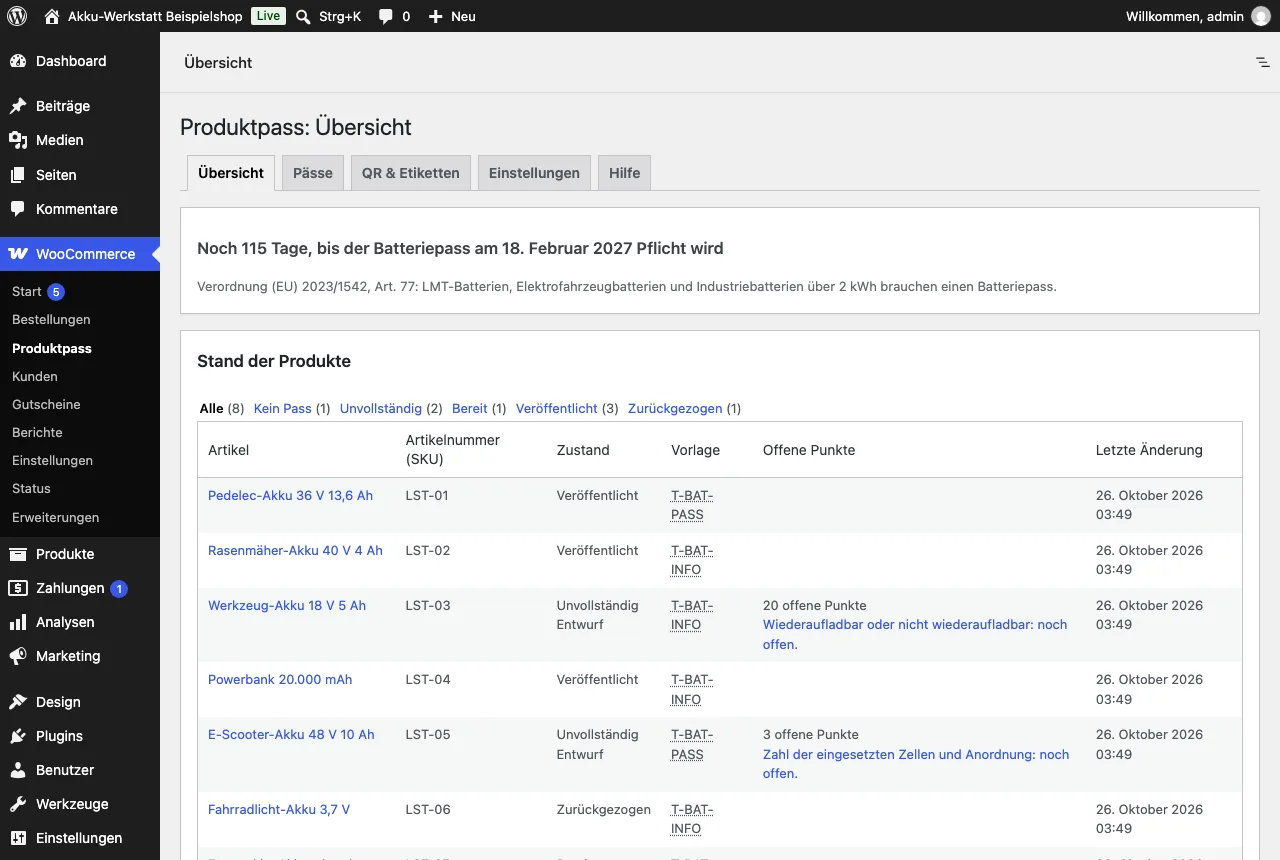
The overview shows what is still missing; publish complete passports and print the QR codes as SVG or PNG.
Compatibility
WordPress 7.0 and 7.1, WooCommerce 11.1 and 11.2, PHP 8.2 to 8.4, MySQL 8.0 or MariaDB 10.6 and newer; classic themes such as Storefront and block themes such as Twenty Twenty-Five.
Help
Installation, web server, badge, Pro and the CSV import are explained in the help for Produktpass for WooCommerce.
Produktpass helps you with the battery passport and the battery QR code under Regulation (EU) 2023/1542. The plugin's texts, templates and notes are not legal advice. You remain responsible for your duties and for the accuracy of your data. For a binding answer on your own case, ask a lawyer.
What you can rely on
No outside services
The plugins call no third-party server. Only Produktpass Pro asks our licence server about its licence and updates, without data of your customers.
No cookies
Neither the survey nor the passport pages set cookies or store anything in your buyers' browsers.
GDPR-friendly
Built to keep data to a minimum: everything is in your shop's database, and Kaufquelle deletes on fixed periods.
Support within two working days
Write to us by e-mail; you get a first answer within two working days.
Made in Frankfurt am Main
Developed and supported in Frankfurt am Main, Germany.