
Platform JTL-Shop
JTL-Shop Plugins
Two plugins for JTL-Shop 5: Kaufquelle asks your buyers after the order how they found your shop; Produktpass creates battery passport pages and battery QR codes. Both keep their data in your shop and send nothing to other servers.
Survey on the order confirmation page
Kaufquelle
Ask your buyers right after the order how they found your shop, and see the revenue per marketing channel. No cookies, no outside services: the answers stay in your shop's database.
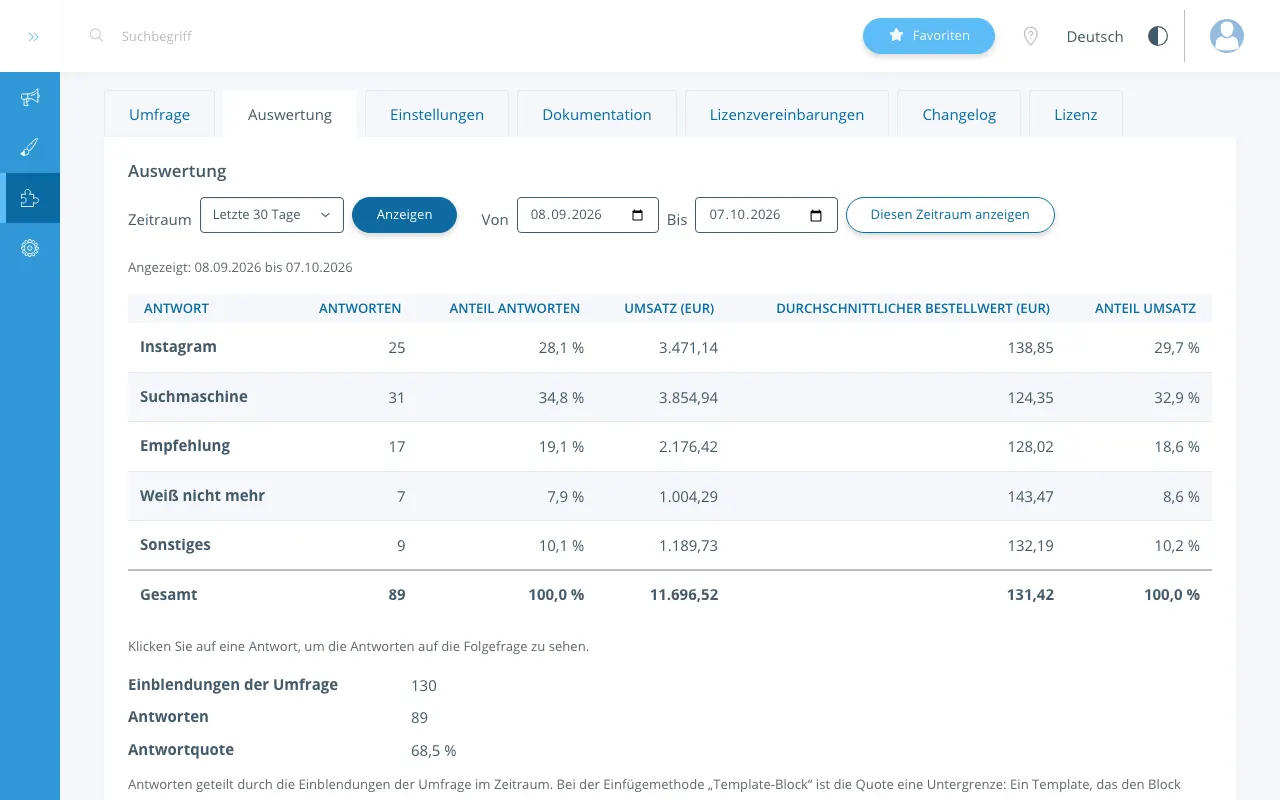
First-hand attribution
Your buyers tell you themselves which channel brought them to you: right after the order, with one click, without tracking.
Revenue per answer
The report shows per answer the number of responses, the revenue, the average order value and the shares, plus the response rate; both tables also as a CSV file.
No cookies, data in your shop
The survey sets no cookies and calls no other server. The answers are in your shop's database; we receive no data.
Ready in three steps
Step 1: Install
In your shop's backend, link the purchase under "Plug-ins > My purchases" and click "Install" next to Kaufquelle.
Step 2: Switch on
Enter the question and the answers in the "Survey" tab, and set "Survey active" to "Yes" in the "Settings" tab.
Step 3: Done
From the next order on the survey appears, and the report fills with every answer.
Battery passport and battery QR code
Produktpass
Creates battery passport pages and battery QR codes on your shop's domain, with the fields of Regulation (EU) 2023/1542, Annex XIII.
Key date
18.02.2027
From 18.02.2027, every battery placed on the EU market needs a QR code (Regulation (EU) 2023/1542, Art. 13(6)).
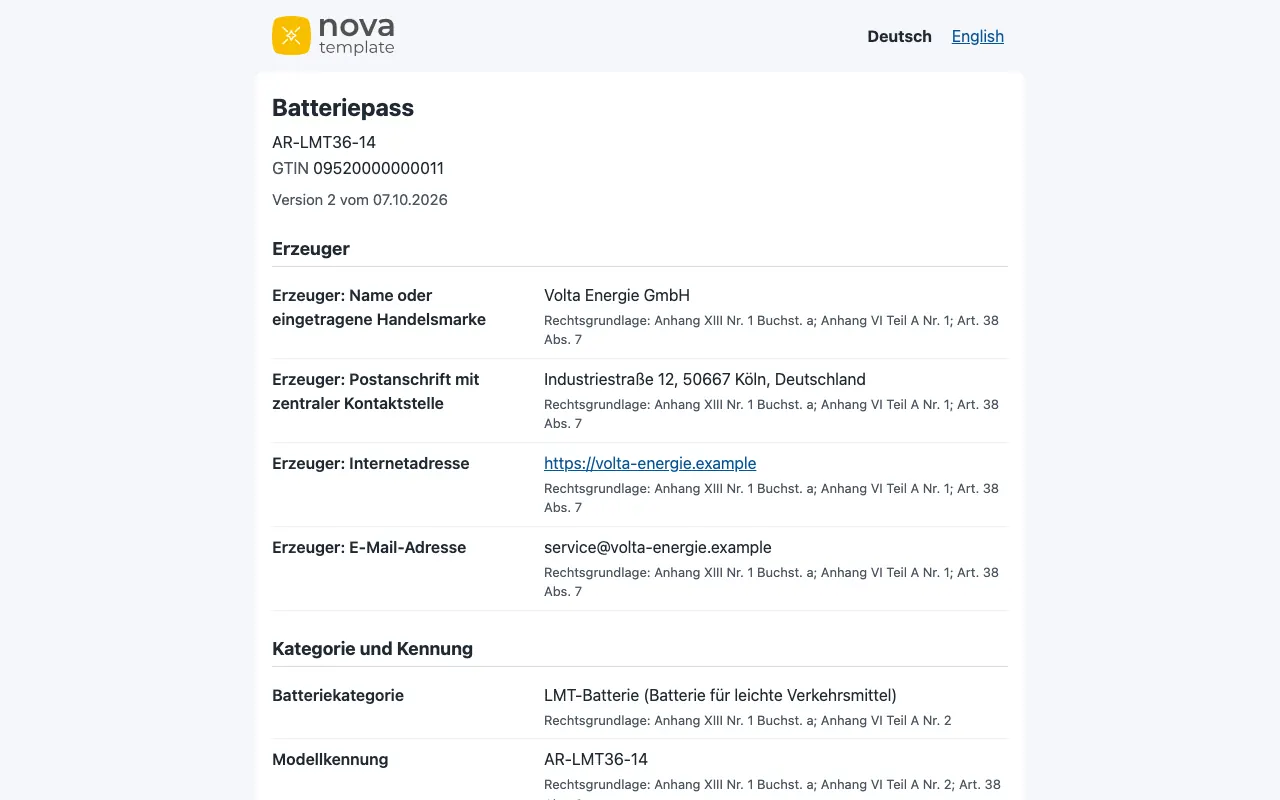
Passports and QR codes on your domain
Battery passport pages and battery QR codes on your shop's domain, with the fields of Regulation (EU) 2023/1542, Annex XIII; every field says which article asks for it.
Data from JTL-Wawi
Takes data from JTL-Wawi attributes. Or fill in a CSV template, or enter the values in the passport editor.
Your passports stay online
Even if you cancel, your passports stay online as long as the plugin stays active; printed codes keep working.
Ready in three steps
Step 1: Install
In your shop's backend, link the purchase under "Plug-ins > My purchases" and click "Install" next to Produktpass.
Step 2: Set up
Enter the responsible operator under "Settings" and click "Map automatically" under "Wawi mapping".
Step 3: Done
The overview shows what is still missing; publish complete passports and print their QR codes as SVG or PNG.
Compatibility
JTL-Shop 5.6, 5.7 and 5.8 with PHP 8.2 to 8.4 (JTL-Shop 5.7 and 5.8 run only on PHP 8.3 or newer), MariaDB 10.11 or MySQL 8.0, with the NOVA template or a child template of NOVA.
Frequently asked questions
Answers to frequent questions are on the plugins' pages: questions about Kaufquelle and questions about Produktpass.
Help
Installing, setting up and privacy are explained in the help for Kaufquelle and the help for Produktpass.
What you can rely on
No outside services
The plugins call no other server and send no data to us or to third parties.
No cookies
Neither the survey nor the passport pages set cookies or store anything in your buyers' browsers.
GDPR-friendly
Built to keep data to a minimum: everything is in your shop's database, and Kaufquelle deletes on fixed periods.
Support within two working days
Write to us by e-mail; you get a first answer within two working days.
Made in Frankfurt am Main
Developed and supported in Frankfurt am Main, Germany.