
Kaufquelle for JTL-Shop 5
Kaufquelle: How did you hear about us?
The survey on the order confirmation page of your JTL shop.
Ask your buyers right after the order how they found your shop, and see the revenue per marketing channel. No cookies, no outside services: the answers stay in your shop's database.
In preparation: not yet in the JTL Extension Store
Help for KaufquelleWhat Kaufquelle gives you
First-hand attribution
Your buyers tell you themselves which channel brought them to you: right after the order, with one click, without tracking.
Revenue per answer
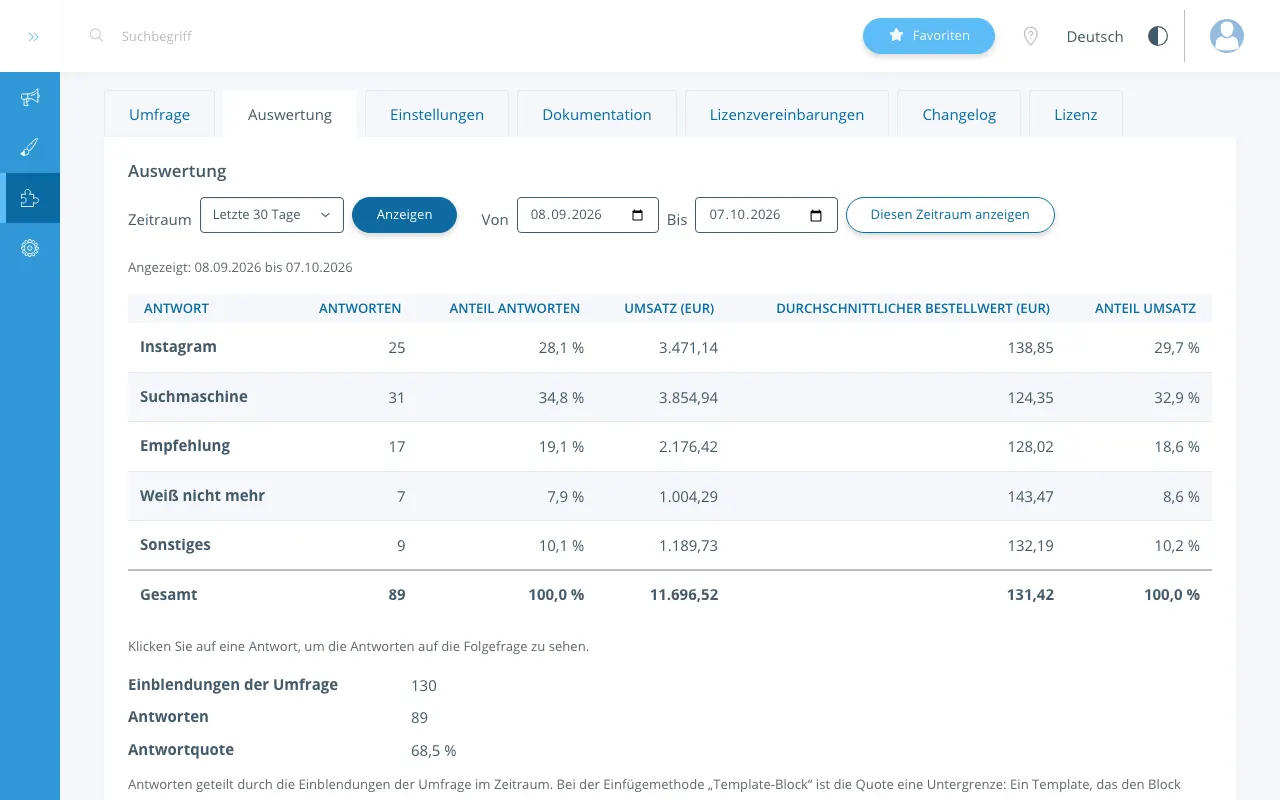
The report shows per answer the number of responses, the revenue, the average order value and the shares, plus the response rate; both tables also as a CSV file.
No cookies, data in your shop
The survey sets no cookies and calls no other server. The answers are in your shop's database; we receive no data.
Where do your buyers come from?
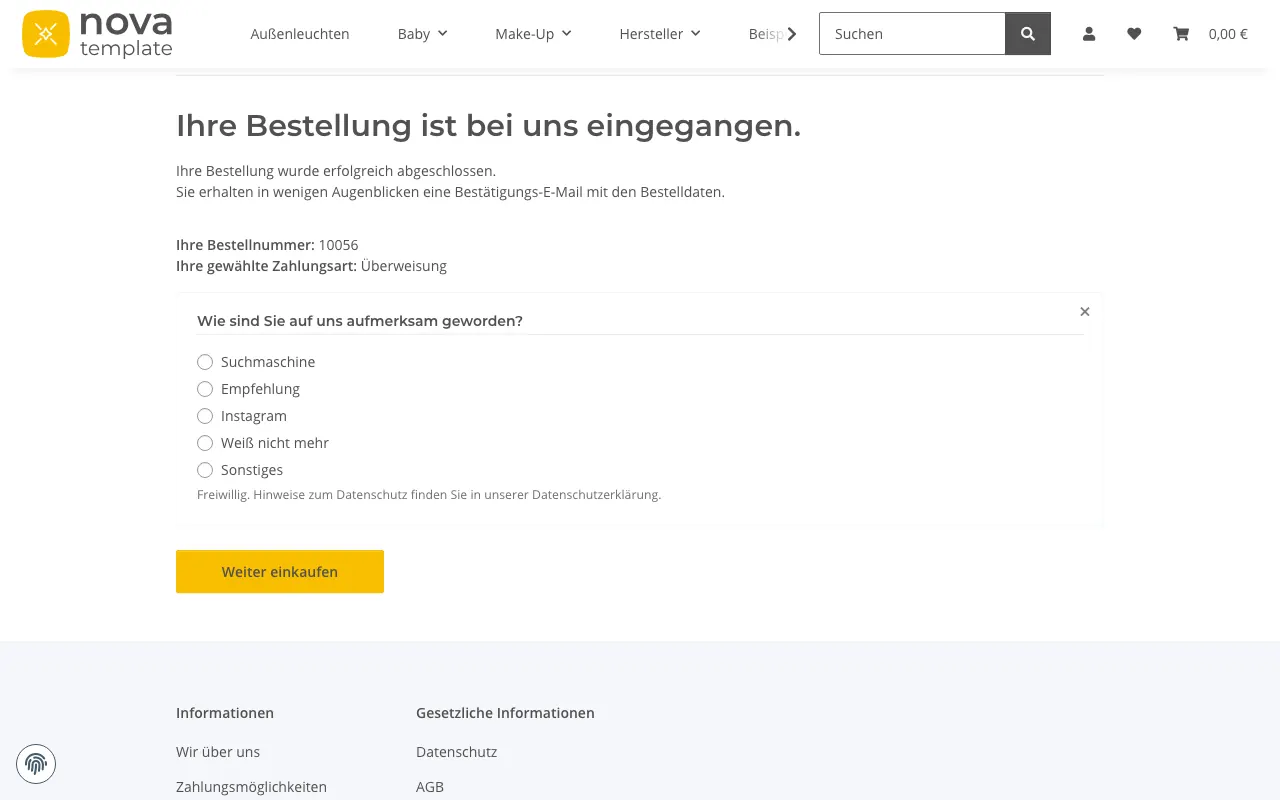
Ads, a search engine, Instagram, a recommendation or the trade fair: Kaufquelle asks your buyers themselves, right after the order, which marketing channel brought them to you.
A short, voluntary customer survey appears on the order confirmation page, for example "How did you hear about us?". Your buyers answer with one click. Kaufquelle stores the answer with the order value, and in the "Report" tab you see how many responses and how much revenue fall on each answer: first-hand attribution, revenue per channel, without tracking.
What the report shows
For a period of your choice, Kaufquelle shows per answer the number of responses (one per order), the revenue, the average order value and the shares of responses and revenue, plus the response rate. You see the answers to the follow-up question and the texts for "Other" one by one. You download both tables as CSV files.
Light on your shop
The survey's script and stylesheet load only on the order confirmation page; compressed, the script is smaller than 6 KB and the stylesheet smaller than 3 KB. On every other page of your shop, Kaufquelle loads neither script nor stylesheet and makes no database queries of its own. The survey reserves its space before it appears, so nothing on the page jumps.
Ready in three steps
Step 1: Install
In your shop's backend, link the purchase under "Plug-ins > My purchases" and click "Install" next to Kaufquelle.
Step 2: Switch on
Enter the question and the answers in the "Survey" tab, and set "Survey active" to "Yes" in the "Settings" tab.
Step 3: Done
From the next order on the survey appears, and the report fills with every answer.
Features
- Customer survey on the order confirmation page of JTL-Shop: one question with 2 to 12 answers, answered with one click
- "Other" with a text field for up to 200 characters
- A follow-up question after answers of your choice, with answers to choose from or as a text field
- Answers in random order, so that the first answer is not favoured; answers such as "Don't remember" can always stay last
- Questions and answers in every language of your shop; buyers see the survey in the language of their order
- Report per answer: number of responses, revenue, average order value, shares, response rate; period filter with presets and a custom period
- CSV export of the report and of the single answers (UTF-8, semicolon, decimal comma)
- Placed through NOVA's template block or at a CSS selector, for templates without that block
- Deleting the answer to an order number when a buyer asks for it
- Deleting with the order: at once through JTL-Wawi, otherwise at the next daily cleanup
- Daily cleanup: displays without an answer after 30 days, the link to the order after 24 months
- No cookies, no browser storage, no calls to other servers
- Administration in German and English; the survey's fixed texts in German and English, editable in the plugin's language variables
Requirements
- JTL-Shop 5.6, 5.7 or 5.8 (JTL-Shop 5.7 and 5.8 run only on PHP 8.3 or newer).
- The NOVA template or a child template of NOVA. For other templates there is the insertion method "CSS selector".
Price
9.90 euros a month plus VAT, with a 14-day test licence.
Installation, setup and the text for your privacy notice are in the help for Kaufquelle.
From the guide
- Kaufquelle: where do my customers come from? The survey after the order
Where do my customers come from? A short survey on the order confirmation page of JTL-Shop asks buyers directly: “How did you hear about us?”. How it works and what you learn from it.
- Revenue per marketing channel without tracking and cookies
Measure revenue per marketing channel without tracking and without cookies: how your buyers' answers and the order value become a report per channel, and how to read it.
- Privacy with shop plugins: what stays in the shop and what does not
Which data a shop plugin stores, where it lives, how long it stays and whether anything leaves the shop: the four questions to ask every plugin, answered for Kaufquelle and Produktpass.
Frequently asked questions
Does the buyer have to answer?
No. The survey is voluntary, and a note below the question says so. Buyers can close it or simply move on; then no answer is stored, only the display, which is deleted after 30 days.
Does Kaufquelle set cookies? Do I need an entry in the cookie banner?
Kaufquelle sets no cookies, stores nothing in the browser and loads nothing from other servers. Which details your privacy notice needs, please clarify with your data protection adviser. A suggested paragraph about the survey is in the help for Kaufquelle.
Where are the answers stored?
In your shop's database. We receive no data.
Does Kaufquelle work with my template?
With NOVA and with child templates of NOVA that do not replace the area above "Continue shopping", the survey appears above that button. If your child template replaces that area, the survey does not appear there. If your template lacks that place or replaces it, choose the insertion method "CSS selector" in the settings and enter the element of the order confirmation page where the survey should appear, for example .order-completed. After the next order, the "Survey" tab shows whether the selector found its element.
Can I show the survey in several languages?
Yes. You enter the question and the answers for every language of your shop. Buyers see the survey in the language of their order; if texts are missing for a language, the survey does not appear in it, and a note in the "Survey" tab names that language.
What happens to old answers when I change or switch off an answer?
Deactivate an answer that buyers have already chosen instead of deleting it. It then no longer appears in the survey but stays in the report with its label.
A buyer asks for their data to be deleted. What do I do?
In the "Report" tab, enter the order number and delete the answer to it. The deletion is recorded with the order number and your admin name in the shop's log; the entry stays for 90 days.
Does Kaufquelle slow down my shop?
Kaufquelle loads its script and stylesheet only on the order confirmation page and makes no database queries of its own on other pages. For every version we check these limits: under 15 milliseconds of server time for the survey in 95 of 100 orders, a script under 6 KB and a stylesheet under 3 KB (compressed), and under 150 milliseconds until an answer is stored in 95 of 100 answers.
Can I test Kaufquelle before buying?
Yes, with the test licence for 14 days. When it ends, JTL-Shop disables the plugin; the stored answers stay in your shop's database.
What happens when my paid licence ends?
The survey no longer appears. The report, the CSV files and your survey stay available in the backend, so that you can get at your data. After the renewal the survey appears again without any setup. Keep the plugin active for that; the help describes the way back if it was disabled.
How do I reach support?
By e-mail to support@extensionfoundry.com. You get a first answer within two working days.
What you can rely on
No outside services
The plugins call no other server and send no data to us or to third parties.
No cookies
Neither the survey nor the passport pages set cookies or store anything in your buyers' browsers.
GDPR-friendly
Built to keep data to a minimum: everything is in your shop's database, and Kaufquelle deletes on fixed periods.
Support within two working days
Write to us by e-mail; you get a first answer within two working days.
Made in Frankfurt am Main
Developed and supported in Frankfurt am Main, Germany.